Multilingual trade show leads
Every business card from the show, saved as a contact.
- Never lose a card. The photo is saved before anything else, so a card is never lost, even with no signal in the hall.
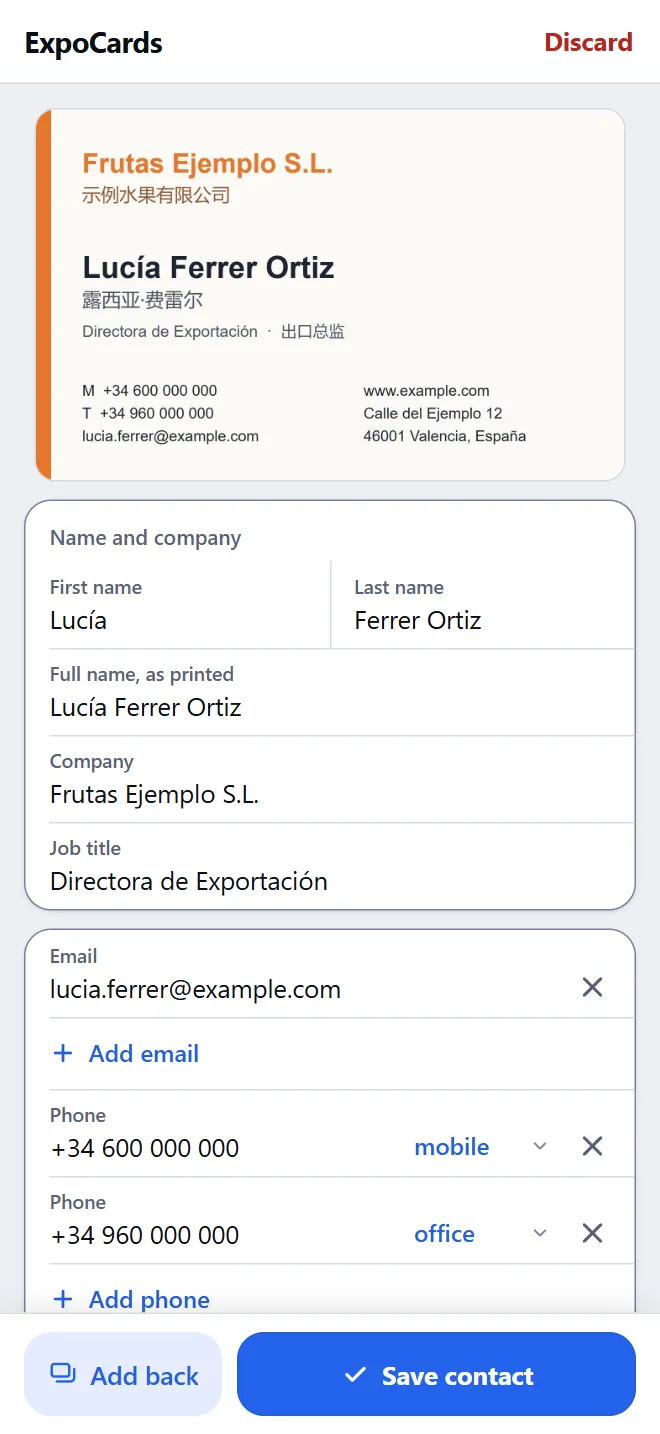
- Reads mixed-language cards. Spanish, German, Dutch, Arabic, Chinese and more, including cards printed in two languages. Names and companies are kept as printed, not translated.
Also on iPhone: Download on the App Store
No sign-in, no ads, no tracking. It runs in your phone's browser, and you can add it to your Home Screen.
No sign-in, no ads, no tracking. The iPhone app is free to download, with optional in-app purchases.
What it looks like
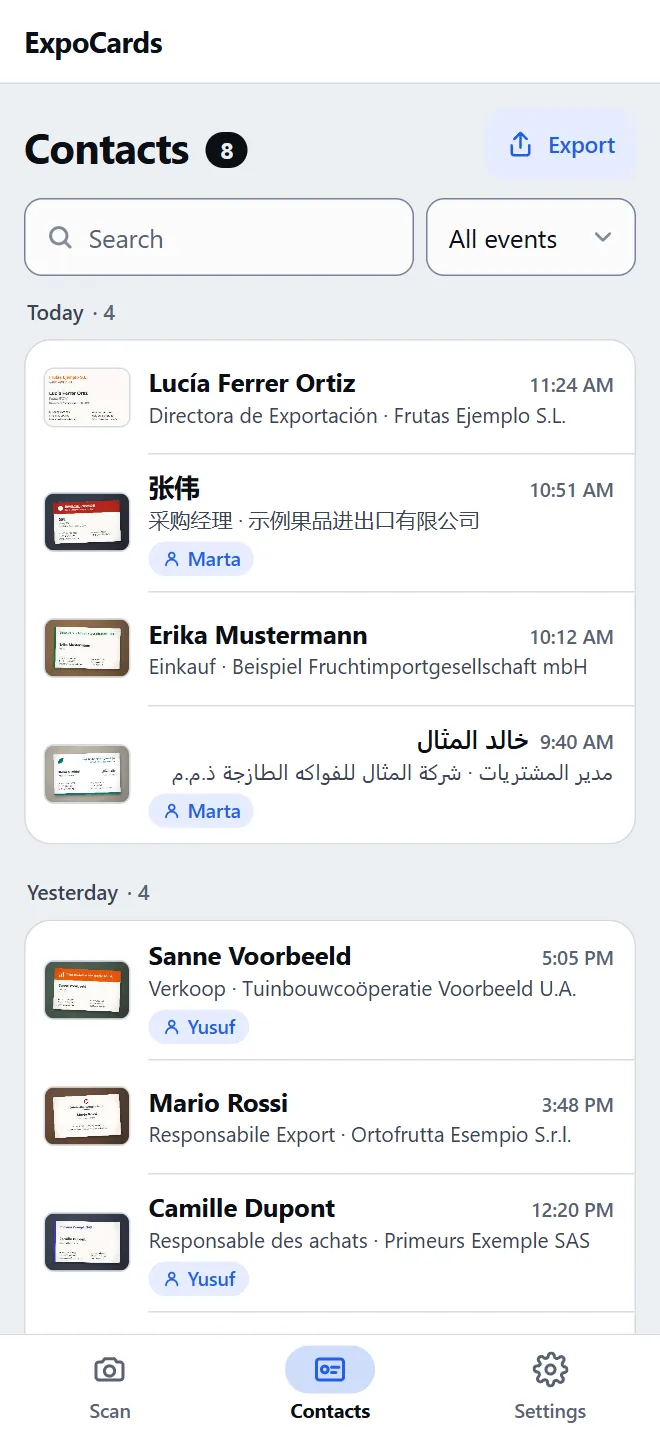
Swipe sideways for more screens.
How it works
- Photograph the card. The photo is saved on your phone first. Only after that does anything go over the network.
- Check what was read. The photo goes to our server, where Anthropic's Claude AI reads it in a few seconds. You see every field next to the photo and correct anything before you save. A card that was hard to read is flagged.
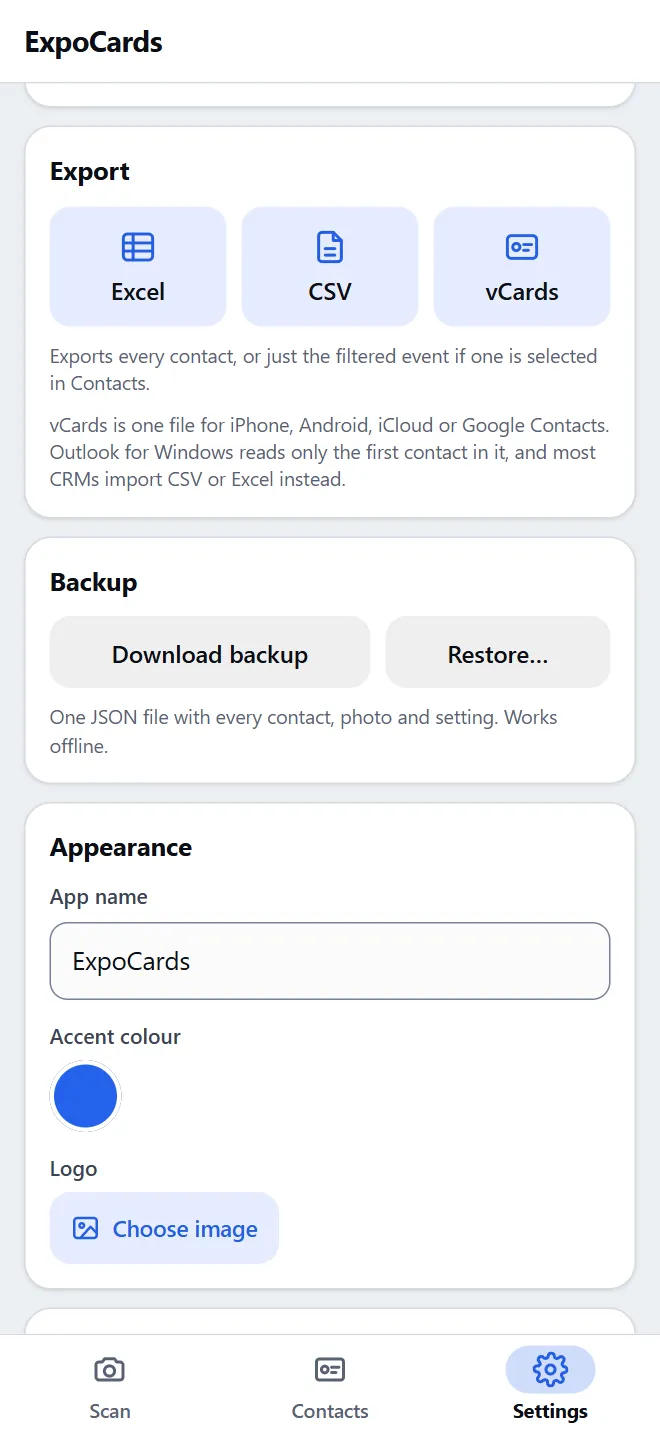
- Export your leads. Excel, CSV or vCard, for all your contacts or a single event, whenever you like.
No signal in the hall?
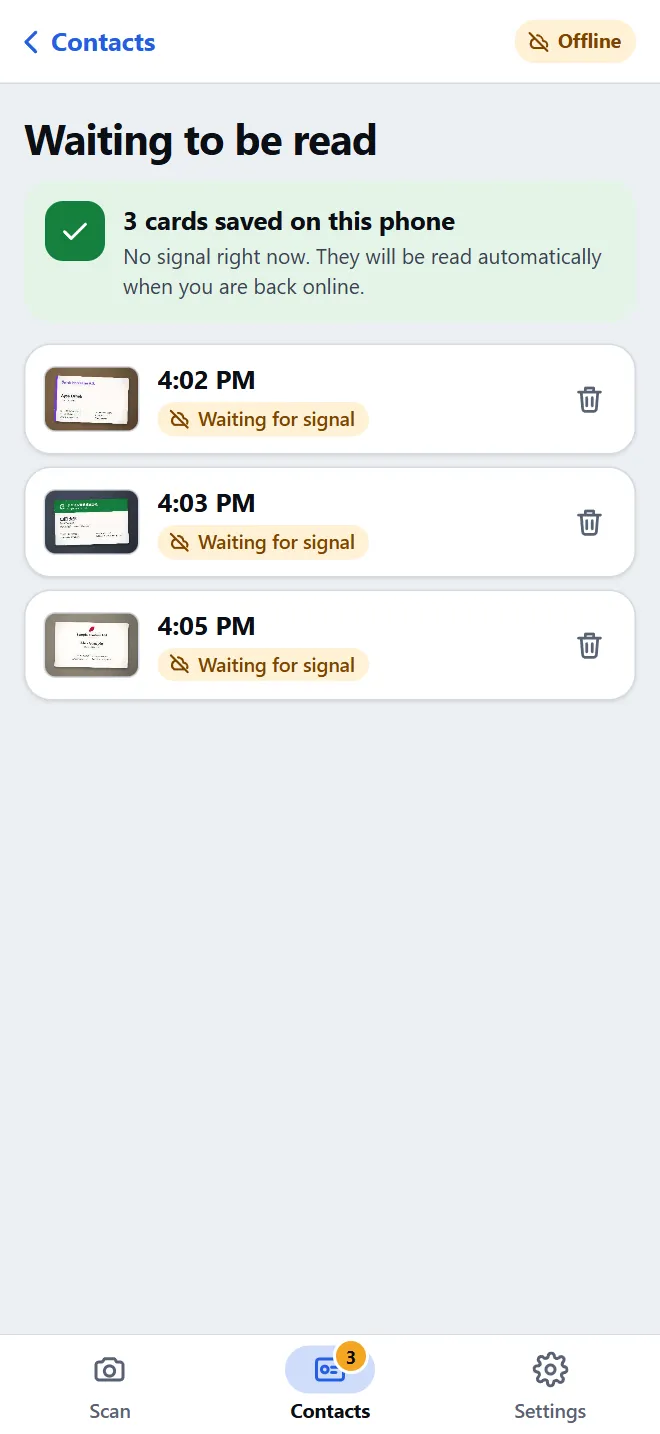
Reading a card needs an internet connection. Without one, the photo waits in a queue on your phone and is read automatically once you are back online. Everything else works with no connection: viewing, editing, searching and exporting your contacts.
Get ExpoCards
The ExpoCards app for iPhone is on the App Store.
The web app works in the browser you already have. Add it to your Home Screen and it opens from its own icon like any other app, even with no connection.
Also on iPhone: Download on the App Store
iPhone (Safari)
- Open the web app in Safari.
- Tap the Share button.
- Choose “Add to Home Screen”.
Android (Chrome)
- Open the web app in Chrome.
- Tap the ⋮ menu.
- Choose “Add to Home screen” or “Install app”.
Android app (APK)
- Tap “Download for Android (APK)” above.
- Open the downloaded file.
- Android asks whether your browser may install apps. Allow it for this install.
This is a direct download from us rather than from Google Play, which is why Android checks with you first.
What it costs
ExpoCards includes 10 free scans in the month of your first scan, then 5 free scans every month, and Settings always shows how many you have left. Need more for a big show? Paid options are in the ExpoCards iPhone app, as in-app purchases: the App Store shows the price in your currency before you pay, and nothing renews. The web app and the Android app have the free scans only.
ExpoCards includes 10 free scans in the month of your first scan, then 5 free scans every month, and Settings always shows how many you have left. Need more? The ExpoCards iPhone app offers three in-app purchases, each a single payment that never renews, at the price the App Store shows in your currency:
- ExpoCards Unlimited – AnnualUnlimited scans for 365 days: every show of the year, with no monthly, yearly or daily scan limit.
- ExpoCards Unlimited – MonthlyUnlimited scans for 30 days: one show, and every card it brings.
- 500 scansScans that never expire, for the odd card between shows.
The web app and the Android app have the free scans only.
Unlimited means there is no number of scans to run out of. It is for the cards you receive for your own business: no automated uploads, no bulk digitising of card archives, no scanning for other businesses and no reselling. A speed limit of 300 scans an hour, far more than anyone photographs at a stand, stops automated uploads.
What is free stays free
The free allowance can grow. We will never cut it back, and never take away something you already have.
Your contacts are yours
Limits only ever apply to new scans. Viewing, editing, searching and exporting what you have captured is free, always.
Your data
Contacts and card photos are stored on your device. To read a card, the photo and a random anonymous id that counts your scans are sent over an encrypted connection to our server, which passes the photo to Anthropic's Claude AI to be read and does not keep it. Cards are not read on your phone; that step needs a connection.
No sign-in, no ads, no tracking, and this page loads nothing from anyone but us. If you open it from a link carrying a tag, such as ?ref=li-page-en, we add one to that tag's count for the month. The count keeps nothing else: no IP address, cookie or anything that identifies you or your device.
If you then tap the App Store button, that tap is counted the same way, under its own tag, and the link carries the tag to the App Store, so that Apple can tell us how many downloads each of our links brought.
Read the privacy policyQuestions
Does it work with no signal?
Reading a card needs an internet connection, because cards are read on our server and not on your phone. Everything else works without one. The photo is saved in a queue on your phone the moment you take it and is read automatically once you are back online. Viewing, editing, searching and exporting your contacts never need a connection.
What happens to the photos of my cards?
Each photo is saved on your device first. To be read, it is sent over an encrypted connection to our server, which passes it to Anthropic's Claude AI and does not keep it. Anthropic deletes it within 30 days and by default does not train its models on it. The reading is done entirely by software: nobody transcribes your cards by hand. The copy on your device stays with the contact until you delete it.
Which languages can it read?
Spanish, German, Dutch, Arabic, Chinese and more, including cards printed in two languages at once. Names, companies and job titles are kept as printed rather than translated. You check every field before the contact is saved, and a card that was hard to read is flagged.
Is the app itself in my language?
The app's menus and buttons are in English. The cards it reads can be in many languages.
How do I get my contacts out?
Export all your contacts, or a single event, as an Excel spreadsheet, a CSV file or vCards. Share one contact as a vCard with the card photo attached. A backup file holds every contact, photo and setting, and can be restored on another phone or browser. Export is never limited.
Do I need an account?
No. There is no sign-in, no email and no password. The first time it opens, the app creates a random anonymous id, and our server uses it only to count your scans.
Does it work on both iPhone and Android?
Yes. The web app runs in Safari on iPhone and in Chrome on Android. Add it to your Home Screen and it opens like any other app. On iPhone there is also the ExpoCards app, on the App Store.
Leads de feria multilingües
Todas las tarjetas de la feria, convertidas en contactos.
- Ninguna tarjeta se pierde. La foto se guarda antes que nada, así que una tarjeta nunca se pierde, ni siquiera sin cobertura en el pabellón.
- Lee tarjetas en varios idiomas. Español, alemán, neerlandés, árabe, chino y más, incluidas las tarjetas impresas en dos idiomas. Los nombres y las empresas se conservan tal como están impresos, sin traducirlos.
También en iPhone: Consíguelo en el App Store
Sin registro, sin anuncios, sin rastreo. Funciona en el navegador de tu móvil y puedes añadirla a la pantalla de inicio.
Sin registro, sin anuncios, sin rastreo. La app para iPhone se descarga gratis, con compras opcionales dentro de la app.
Así se ve
Desliza hacia un lado para ver más pantallas.
Cómo funciona
- Haz una foto a la tarjeta. La foto se guarda primero en tu móvil. Solo después sale algo por la red.
- Revisa lo que se ha leído. La foto viaja a nuestro servidor, donde la IA Claude de Anthropic la lee en unos segundos. Ves cada campo junto a la foto y corriges lo que haga falta antes de guardar. Si una tarjeta ha sido difícil de leer, queda marcada.
- Exporta tus leads. A Excel, CSV o vCard: todos tus contactos o solo los de un evento, cuando quieras.
¿Sin cobertura en el pabellón?
Para leer una tarjeta hace falta conexión a internet. Si no la hay, la foto espera en una cola en tu móvil y se lee automáticamente en cuanto vuelvas a tener conexión. El resto funciona sin conexión: ver, editar, buscar y exportar tus contactos.
Empieza a usar ExpoCards
La app de ExpoCards para iPhone está en el App Store.
La app web funciona en el navegador que ya tienes. Añádela a la pantalla de inicio y se abrirá desde su propio icono, como cualquier otra app, incluso sin conexión.
También en iPhone: Consíguelo en el App Store
iPhone (Safari)
- Abre la app web en Safari.
- Toca el botón Compartir.
- Elige «Añadir a pantalla de inicio».
Android (Chrome)
- Abre la app web en Chrome.
- Toca el menú ⋮.
- Elige «Añadir a pantalla de inicio» o «Instalar aplicación».
App para Android (APK)
- Toca «Descargar para Android (APK)», aquí arriba.
- Abre el archivo descargado.
- Android te preguntará si tu navegador puede instalar aplicaciones. Permítelo para esta instalación.
Es una descarga directa desde nuestra web y no desde Google Play; por eso Android te pide confirmación.
Cuánto cuesta
ExpoCards incluye 10 escaneos gratis el mes de tu primer escaneo y, después, 5 escaneos gratis cada mes, y en «Settings» (ajustes) ves siempre cuántos te quedan. ¿Necesitas más para una feria grande? Las opciones de pago están en la app de ExpoCards para iPhone, como compras dentro de la app: el App Store te muestra el precio en tu moneda antes de pagar, y nada se renueva. La app web y la app de Android tienen solo los escaneos gratis.
ExpoCards incluye 10 escaneos gratis el mes de tu primer escaneo y, después, 5 escaneos gratis cada mes, y en «Settings» (ajustes) ves siempre cuántos te quedan. ¿Necesitas más? La app de ExpoCards para iPhone ofrece tres compras dentro de la app, cada una de pago único y sin renovación, al precio que el App Store te muestra en tu moneda:
- ExpoCards Unlimited – AnualEscaneos ilimitados durante 365 días: todas las ferias del año, sin límite de escaneos al mes, al año ni al día.
- ExpoCards Unlimited – MensualEscaneos ilimitados durante 30 días: una feria, con todas las tarjetas que traiga.
- 500 escaneosEscaneos que no caducan, para alguna tarjeta suelta entre ferias.
La app web y la app de Android tienen solo los escaneos gratis.
Ilimitado quiere decir que no hay un cupo de escaneos que se agote. Es para las tarjetas que recibes para tu propio negocio: nada de subidas automatizadas, digitalizar archivos de tarjetas en bloque, escanear para otras empresas ni revender. Un límite de velocidad de 300 escaneos por hora, muchos más de los que nadie fotografía en un estand, frena las subidas automatizadas.
Las reglas de uso razonable completas
Lo gratis no se recorta
El cupo gratuito puede crecer. Nunca lo reduciremos, ni te quitaremos algo que ya tengas.
Tus contactos son tuyos
Los límites solo afectan a los escaneos nuevos. Ver, editar, buscar y exportar lo que ya has capturado es gratis, siempre.
Tus datos
Los contactos y las fotos de las tarjetas se guardan en tu dispositivo. Para leer una tarjeta, la foto y un identificador anónimo aleatorio que cuenta tus escaneos se envían por una conexión cifrada a nuestro servidor, que no conserva la foto y se la pasa a la IA Claude de Anthropic para que la lea. Las tarjetas no se leen en el móvil: para ese paso hace falta conexión.
Sin registro, sin anuncios, sin rastreo, y esta página no carga nada que no sea nuestro. Si la abres desde un enlace con una etiqueta, como ?ref=li-page-es, sumamos uno a la cuenta de esa etiqueta en el mes. El contador no guarda nada más: ni la dirección IP, ni cookies, ni nada que te identifique a ti o a tu dispositivo.
Si después tocas el botón del App Store, ese toque se cuenta del mismo modo, con su propia etiqueta, y el enlace lleva la etiqueta al App Store, para que Apple nos diga cuántas descargas ha traído cada uno de nuestros enlaces.
Leer la política de privacidad (en inglés)Preguntas frecuentes
¿Funciona sin cobertura?
Para leer una tarjeta hace falta conexión a internet, porque las tarjetas se leen en nuestro servidor y no en el móvil. Todo lo demás funciona sin ella. La foto se guarda en una cola en tu móvil en el momento de hacerla y se lee automáticamente en cuanto recuperas la conexión. Para ver, editar, buscar y exportar tus contactos nunca hace falta conexión.
¿Qué pasa con las fotos de mis tarjetas?
Cada foto se guarda primero en tu dispositivo. Para leerla, se envía por una conexión cifrada a nuestro servidor, que se la pasa a la IA Claude de Anthropic y no la conserva. Anthropic la borra en un plazo de 30 días y, por defecto, no entrena sus modelos con ella. La lectura la hace íntegramente un programa: nadie transcribe tus tarjetas a mano. La copia de tu dispositivo se queda con el contacto hasta que la borres.
¿Qué idiomas lee?
Español, alemán, neerlandés, árabe, chino y más, incluidas las tarjetas impresas en dos idiomas a la vez. Los nombres, las empresas y los cargos se conservan tal como están impresos, sin traducirlos. Tú revisas cada campo antes de guardar el contacto, y si una tarjeta ha sido difícil de leer, queda marcada.
¿La app está en español?
No: los menús y botones de la app están en inglés. Las tarjetas que lee sí pueden estar en muchos idiomas, y esta página y la de ayuda están en español.
¿Cómo saco mis contactos?
Exporta todos tus contactos, o solo los de un evento, como hoja de cálculo de Excel, archivo CSV o vCard. Comparte un solo contacto como vCard con la foto de la tarjeta adjunta. Un archivo de copia de seguridad guarda todos los contactos, fotos y ajustes, y se puede restaurar en otro móvil o navegador. La exportación nunca está limitada.
¿Necesito una cuenta?
No. No hay registro, ni correo, ni contraseña. La primera vez que se abre, la app crea un identificador anónimo aleatorio, y nuestro servidor lo usa únicamente para contar tus escaneos.
¿Funciona en iPhone y en Android?
Sí. La app web funciona en Safari en el iPhone y en Chrome en Android. Añádela a la pantalla de inicio y se abre como cualquier otra app. En iPhone tienes también la app de ExpoCards, en el App Store.